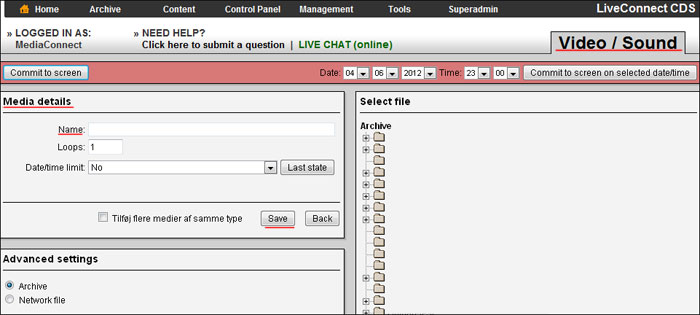

Video and Sound
Video and Sound
Allows you to create video or lydspots to your playlist.
LiveConnect CDS can play the following formats:
| Video type | Filtype |
| AVI | .avi .divx .amv |
| MPEG-PS | .mpg .mpeg .mpe .m1v .m2v .mpv2 .mp2v .m2p .vob .evo .mod |
| MPEG-TS | .ts .m2ts .m2t .mts .pva .tp .tpr |
| MP4 | .mp4 .m4v .mp4v .mpv4 .hdmov |
| MOV | .mov |
| 3GP | .3gp .3gpp .3g2 .3gp2 |
| Windows Media | .wmv .asf |
| RealMedia | .rmvb .rm |
| Digital Video | .dv |
| Material Exchange Format | .mxf |
| DHAV | .dav |
We recommend Windows Media (.wmv)
Video playback is always fully scaled in the layer it is placed in.
NB.: All videos and audio files to be uploaded to the file archive BEFORE they can be used in a playlist!
To create a video or lydspot in your playlist, do the following:
- Select the playlist you want to create the media in.
- Click "Add Media" at the top of the main window.
- Select "Video / Audio" and click "Select".
- Enter a name to the media in the "Name".
- Choose which video / audio file to play in the "Content".
- Click "Save".
The media will now be created in the playlist.